Although Google Earth is a native Linux application and even uses Qt it still looks like a Windows95 application – even in KDE. The problem is that Google Eerth ship its own Qt libraries instead of using the ones installed on the system and thus also does not respect the system settings.
But there is help! If you want to make it look native, make
# assuming you are using the medibuntu packages
cd /usr/lib/googleearth/
sudo rm libQt*
this will fore Googleearth use the system libraries instead, which include a GTK Qt Style. So if you launch googleearth as
googleearth -style GTK+
it will look like this:
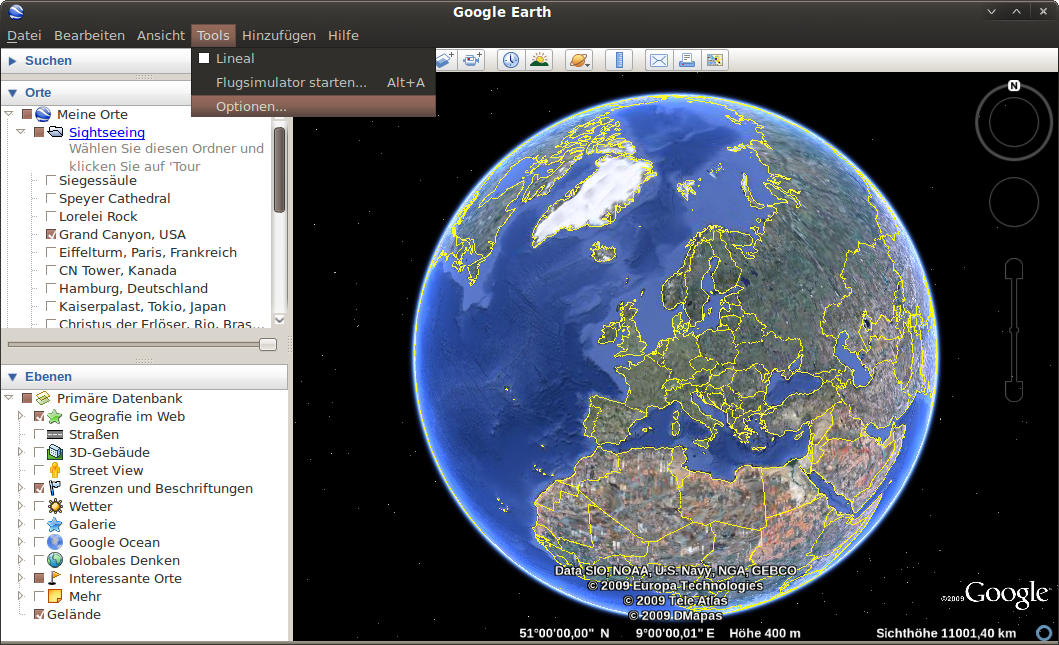
but this will only work on Jaunty, since the GTK Qt Style was just added in Qt 4.5. If you are still on Intrepid you can use
googleearth -style cleanlooks
which will look at least familiar with the default Human Theme.
Thanks a ton.
Gotta love those programmers who are afraid of “Oh, no! they keep changing their libraries!”
Thank you! Love it. I actually have been considering removing Google Earth and never touch it again just because of its uglyness.
Thanks a bunch!
Followed your steps;
cd /usr/lib32/googleearth/
sudo rm libQt*
but I now get an error …
jason@phantom-laptop:~$ googleearth -style GTK+
/usr/lib32/googleearth/googleearth-bin: error while loading shared libraries: libQtWebKit.so.4: cannot open shared object file: No such file or directory
jason@phantom-laptop:~$
Any advice?
apt-get install libqt4-webkit
it’s not free software ?
On AMD64 there is nothing in either /usr/lib/googleearth or /usr/lib64/googleearth; all the data is in /usr/lib32/googleearth. There is no libQt* in this dir either. There is a libqt-mt.so.3. However when I remove this the application complains it cannot find this particular library. Google Earth often crashes during start up, and the Earth keeps flickering (maybe my Intel graphics driver doesn’t do hardware rendering right now). I’m running Jaunty btw, and the Google Earth version included is 4.3. I’m running the New Wave theme. When Google Earth is fired up and doesn’t crash right away the theme looks pretty OK with the notable exception being the fonts. Well, that, and the application usually crashes within 5 seconds. =]
Awesome, awesome tip!
I’m using Jaunty and the first part gave me an error, however running the second command worked fine! Google Earth using GTK is really darn sexy!
What is this theme that you are using? I love it!
OR you can just use “googleearth -style GTK+” without removing any files. Better yet, edit the Gnome menu entry for Google Earth and set that as the command. I’m using Jaunty and the Medibuntu packages, and this works with no trouble.
Yeah, the Medibuntu packages picked up the changes, so you basically only need the second command.
I had some problems using the medibuntu GoogleEarth package regarding kml files. When I tried to display for instance points stored in a kml/kmz file in Googleearth, they were displaced from their true position. Furthermore lines and polygons where completely messed up. Several different points in a kml file where shown all at the same location etc. So I downloaded and installed GoogleEarth from google. The problem disappeared. But the standard look and feel is ….. Trying to use this trick in this post brought me back to the problem with handling kml/kmz files. So in the end I think the problem is linked to the Qt library coming with ubuntu 9.04 (libQtCore and libQtGui).