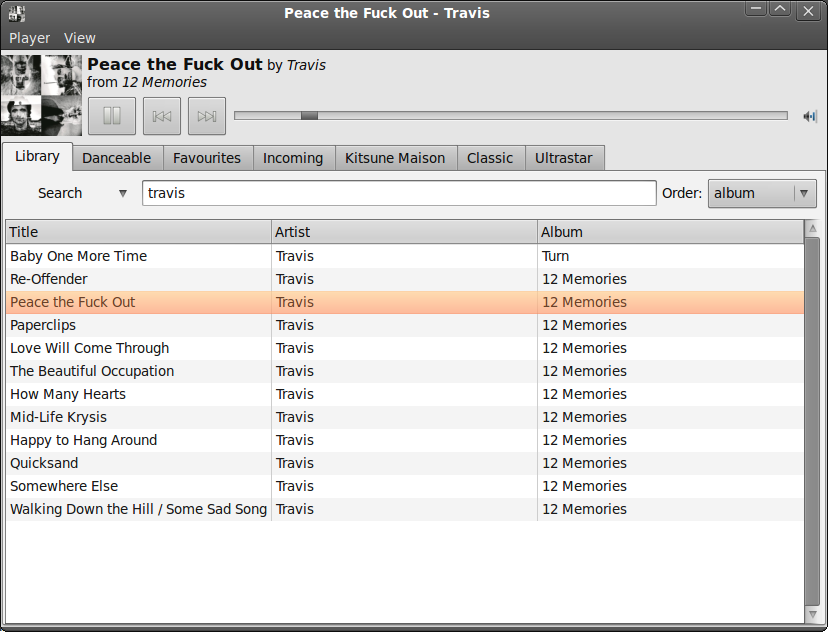
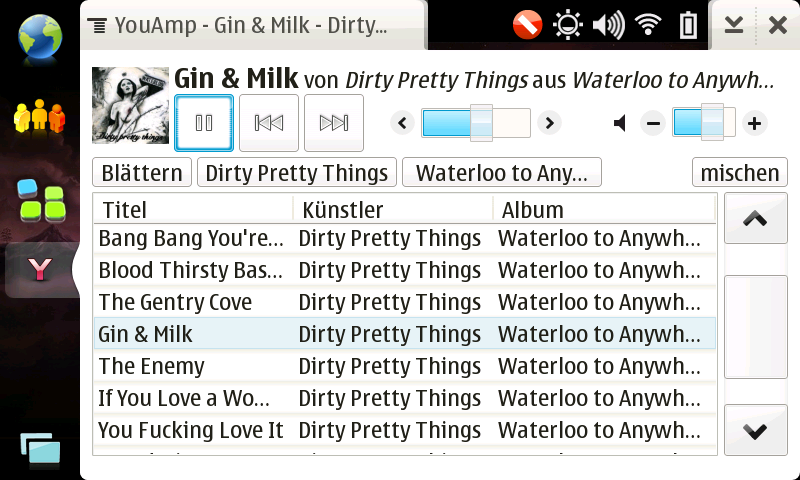
YouAmp

YouAmp is my music player project. It started out of pure interest, but after I got me a N800 which lacks a decent build-in music player I started porting it to Maemo.

It is meant as an alternative to the spiffy UI centric players like UKMP or Canola and thus it concentrates on the playback capabilities.

Currently the startup time is a bit high and on first startup it will scan your SD cards for music files, which might take a while.

If the music title is displayed in red it means that no ReplayGain Information could be found and the default of -10db is being used.

Features

  • Music browser
  • Cover Art Display
  • last.fm submission
  • Searchable database
  • Replaygain Support
  • smart Replaygain mode selection
  • mp3, ogg, wmb, m4a playback
  • controllable with RPC

Download

YouAmp is now in the Maemo extras repository, so you can easily install it using the package manager. Alternativley you can use the one click install link below

Install YouAmp

Usage

At the first start YouAmp will scan your SD cards for music files and add them to its music library. This will take some time, depending on how many music files you have. Dont worry subsequent starts will be much faster, since it only looks for changes then.

YouAmp does not automatically download cover art - instead it looks for an image in the same folder as the current musc file. So if you want it to display the cover, you have to manually put it in the album folder.

While playing the music YouAmp might display the song info in red; this indicates that the song does not contain any replaygain information, which are needed in order to normailize the volume. You can add replaygain information to your files using replaygain and vorbisgain on Linux or foobar2000 on Windows.

By default replaygain scanners normalize the volume to 89db - if you would like to change this to another value, use the Replaygain Preamp Slider in the preferences. Non normalized files are mostly around 100db, therefore YouAmp applies by default a -10db amp to them - if you would like to change that use the No Replaygain Amp Slider in the preferences.

RPC

if you want to control the player with the console, you can use the following D-Bus calls:

  • net.rojtberg.youamp.toggle
  • net.rojtberg.youamp.prev
  • net.rojtberg.youamp.next

Planned Features

  • Playlists

Code

The player is written in Python using pygtk and pygst. You can find the svn repository at garage.maemo.org. Any contributions are welcome.

9 Responses to “YouAmp”

  1. DSS Says:

    Great media player. Every time a new version of Canola, Kagu and so forth come out I always try them for a while. Then I get frustrated with their lack of basic music managing/browsing/playing capabilities or simply their load time and return to YouAmp. I can simply start YouAmp and press play to start the music I had loaded last - I can’t do that in Canola. I can locate any song I want to hear easily in YouAmp without blowing away my whole playlist - I can’t do that in Kagu. Canola I use to demo the Enlightenment Foundation Libraries, YouAmp I use to listen to music. The only things I would like to see is support for maemoscrobbler and the ability to create/manage playlists.

  2. Tony Green Says:

    First impression is very favourable. YouAmp seems to offer the functionality I want without the bloat of some of the other players. It seems to scan for new files much quicker than the standard media-player’s backend, which is a bonus. As long as it doesn’t wipe out my battery when I leave it loaded but not running (something Canola and most other players seem to do) it’s going to become my standard music player.

    One small enhancement I’d find useful would be to have a way to restrict where it scans for files. That way I could have other audio files on my device for other things that wouldn’t appear on the playlist. But this is a very minor thing…

  3. Zentis666 Says:

    I like this fast player but for me it is a problem that only sd-cards as media are supported.
    I have a huge number of mp3s that are available on my samba server (I can access the file system from my n800
    without problems) and I also want to play music from my usb hard disk from time to time which also can be accessed via n800. But I did not find any player on n800 with database support that shows these “folders” in their setup menus.
    It would be great if the available media-sources could be configured in this program.

  4. Pavel Says:

    deleted all bugreport & feature request comments, since they don’t really belong here.

  5. Elsehow Says:

    i downloaded 2 days ago you amp but still didn’t understand how works the ‘last.fm’ feature. i inserted the login name and password but it’s always disconnected. please let me know

  6. Pavel Says:

    try starting it from the console - maybe you entered the wrong account information. Next version will tell you that info from the preferences menu.

  7. Kevin B. Says:

    Thanks for creating this app. Much more responsive than the built-in media player. Simple and easy to use UI, just like it should be. :-) You actually make my life difficult because part of what I’m supposed to be doing is testing the built-in media player, but I really prefer to use YouAmp. ;-)

    My only big request would be for playlists, but I see you already have that on your ToDo list. The ability to sort by “title” (when doing all artists/all songs) would also be very nice to help me find a single song, but I can live without that. Oh, being able to not show the Album column (or being able to pick what columns are shown) would be really nice. Hopefully the suggestions are useful to you.

    Kevin

  8. Doug Says:

    Love this app. I have downloaded and used on the fancy applications (e.g.; Kagu and Canola). But I keep returning to YouAmp because it loads quickly, is solid and I can quickly get to the music I want.
    HELP: This past week I can’t seem to get YouAmp to run any longer. I tried to re-download an Install from your page ( ‘Click to Install’ link above) however it reports Failed Catalogs (Anderende Repository and Linuxvision Package repository). I get a 404 when it is looking for files at these two locations. Is there an alternate location?
    I am using a N800 running OS2008 Ver 2.2007.50-2

    Thanks

  9. Alex Lukin Says:

    Great soft! Thank you very much. Could you please fix cyrillic? And it would be very nice to be able to just browse and load files like old xamp does.
    Not all mp3 have right tags so it is very unconvinient to search and play them.

Leave a Reply